
Introduction
In a world where data drives everything, file comparison has become an essential task in many industries, from software development to digital forensics. If you’ve ever tried comparing files manually, you know it’s like finding a needle in a haystack. That’s where HexCmp comes in—a tool designed to make file comparison not just easier, but faster and more accurate. Whether you’re comparing two large binary files or looking for subtle differences in text documents, HexCmp is up to the task.
In this article, we’ll dive deep into the features of HexCmp, explain how it works, and why it stands out from the crowd. We’ll cover everything from its interface and use cases to its limitations and FAQs. Let’s take a look at what makes HexCmp a game-changer!
What is HexCmp?
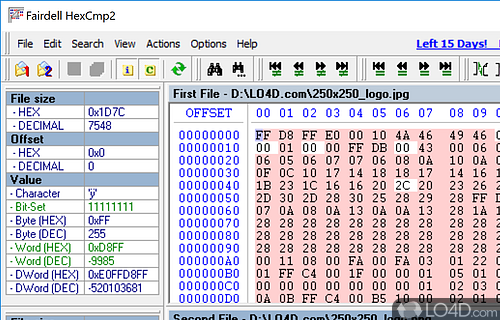
HexCmp is a software utility that helps users compare two files—whether text or binary—in a side-by-side hexadecimal view. The tool highlights differences, allowing users to quickly see where files diverge. It’s widely used in industries like software development, reverse engineering, and network security, where it’s critical to pinpoint discrepancies in code, data packets, or configuration files.
Key Features of HexCmp
HexCmp comes loaded with a bunch of useful features that can help anyone from casual users to seasoned professionals:
- Hexadecimal Comparison: You can compare binary files byte-by-byte, seeing the exact differences in a hexadecimal format.
- Text File Comparison: If you’re comparing text files, HexCmp allows for line-by-line comparison with highlighted differences.
- Synchronization Mode: This mode helps align similar sections of two files, making it easier to compare and analyze.
- Memory-Friendly: Even when comparing large files, HexCmp doesn’t gobble up all your system resources. It’s designed to be lightweight and efficient.
- Search and Highlighting: Easily search for specific bytes or strings within the files and have them highlighted for quick reference.
Why Choose HexCmp?
There are plenty of file comparison tools out there, so why should you opt for HexCmp? Let’s break it down:
- Precision: HexCmp delivers an incredibly detailed analysis, right down to the individual byte level. This can be a lifesaver when you’re trying to track down subtle issues in binary files or executables.
- Ease of Use: The interface is simple, intuitive, and designed to minimize the learning curve. You won’t need to spend hours learning how to use the tool. Plus, HexCmp integrates well into existing workflows, making it a great addition to any toolset.
- Performance: HexCmp is optimized for speed, even when handling large files. You won’t be left waiting while it churns through gigabytes of data.
- Versatility: It’s not just for developers or IT professionals. HeCmp is useful for anyone who needs to compare files, whether you’re a system administrator, a researcher, or even a student. It handles a variety of file types and structures, including plain text, binary files, and complex executables.
How Does HexCmp Work?
The way HexCmp works is quite straightforward. You load two files into the software, and it presents them side-by-side. The software automatically scans the files and highlights differences in red (or another color based on your preference). If there’s a need for an in-depth byte-level comparison, provides a hexadecimal view to show the exact location and value differences.
Step-by-Step Guide to Using HexCmp
If you’re new to file comparison tools, here’s a quick guide to get you started with HexCmp:
- Install HexCmp: Download the latest version from the official website and follow the installation instructions. It’s a quick and easy process!
- Open Files: Launch the program and load two files—these could be anything from text documents to binary files.
- Compare: The files will be displayed side by side. The differences are highlighted, making it easy to spot any discrepancies.
- Analyze Differences: You can toggle between text view and hex view depending on the file type. In hex view, every byte is displayed, so nothing goes unnoticed.
- Sync Mode (Optional): If the files are out of sync due to some additional bytes or lines in one file, the sync feature helps line things up for easier comparison.
- Save Results: If you need a record of the differences, lets you export the comparison results into a report.
Common Use Cases for HexCmp
While is a general-purpose file comparison tool, there are specific scenarios where it shines:
1. Software Development
Ever had a project where you had to compare two versions of a compiled executable? This is where HexCmp’s hexadecimal comparison comes in handy. Developers can compare binary builds of their software to ensure consistency between versions, or to detect subtle changes in compiled code.
2. Digital Forensics
In forensics, it’s often necessary to compare disk images or memory dumps. With , investigators can quickly identify any unauthorized modifications or discrepancies between original and tampered files.
3. Network Security
When analyzing network packet captures, sometimes the data is saved in binary format. HexCmp allows security professionals to dissect these binary files and compare them to known-good files to detect malicious alterations or potential vulnerabilities.
HexCmp vs. Other File Comparison Tools
There’s no shortage of file comparison tools on the market, but has a few unique advantages over its competitors. Let’s look at how HexCmp stacks up:
| Feature | HexCmp | Other Tools |
|---|---|---|
| Hexadecimal View | Yes | Limited |
| Text Comparison | Yes | Yes |
| File Synchronization | Yes | Rare |
| Lightweight Design | Yes | Sometimes |
| Large File Handling | Yes | Struggles |
While other tools may focus more on textual comparisons, HexCmp’s strength lies in its ability to handle both binary and text files with ease. Many tools either don’t support hex comparisons or become sluggish when working with large files. HexCmp keeps things efficient and detailed!
FAQs About HexCmp
1. Is HexCmp free to use?
HexCmp offers a free trial version, but the full software comes at a cost. The trial version is fully functional but may limit the number of comparisons you can perform before requiring a license.
2. Can compare more than two files at once?
No, is designed for comparing two files side-by-side. However, you can run multiple instances of the software if you need to compare more than two files.
3. Does HexCmp support folder comparison?
No, HexCmp focuses on file-level comparisons. If you’re looking to compare entire directories, you might need to use another tool alongside for that task.
4. Is available on MacOS?
As of now, is primarily a Windows-based application. However, some users have reported success running it on MacOS using compatibility layers like Wine.
5. How accurate is in comparing large files?
HexCmp is highly accurate even when dealing with large files. Its performance and memory management make it ideal for processing large datasets without crashing or slowing down.
Conclusion
HexCmp is the go-to solution for anyone who needs to perform detailed file comparisons, especially when dealing with binary files. With its user-friendly interface, efficient processing, and powerful features like hexadecimal view and synchronization mode, takes the headache out of file comparison.
Whether you’re a developer checking for discrepancies between code versions, a security analyst combing through binary data, or even a digital forensics expert looking for tampering, will save you time and frustration. With its precision and versatility, it’s a must-have tool for any tech-savvy professional.
If you haven’t tried yet, it’s time to give it a spin. You’ll wonder how you ever managed without it!
